ExperienceTeamsAcademiesFrontlineCampaignsPricing
ForQuizQuiz-led learning and readiness platform

Prove what changed after training, not just who showed up.

ForQuiz turns one source into a live quiz, a Reference Quiz-informed follow-up, Segment Analytics, and Insight Explorer comparisons across sessions and campaigns.

Turn decks, SOPs, chapters, and briefs into tagged quizzes
Run live proof plus controlled follow-up without repeating exposed answers
Review understanding by participant, segment, topic, and experience
See a sample workflowExplore use cases

Built for teams that need proof of understanding by person, segment, and experience, not participation alone.

Source to outcomes
Source
Live
Follow-up
Insight
Workflow proof
Source to insight
Proof loop
Source
01

Decks, SOPs, chapters, and briefs become tagged quiz material.

Live
02

Run the rollout, class, field check, or campaign as a shared quiz moment.

Follow-up
03

Use Reference Quiz context to avoid repeating exposed learning points.

Insight
04

Compare results by participant, segment, topic, and experience.

Example reporting loop
Identity-aware analytics with export-ready proof
Participant • Topic • Cohort • Export
Completion
91%
Weak topic
Pricing fit
Export status
Ready
The problem

Most quiz workflows break after the session.

Teams can run live quizzes, forms, and exports. The real gap is proving how understanding changed by cohort, segment, and follow-up experience without rebuilding identity and reports by hand.

A live session happens, but no one can compare it with the follow-up check.

Follow-up quizzes repeat exposed learning points instead of testing fresh recall.

Managers still clean up participant identity, segment labels, and topic trends by hand.

Current state
Fragmented after the session
01
Live quiz in one tool
02
Form or sheet for follow-up
03
Manual participant and segment cleanup
04
Comparison rebuilt after the fact
ForQuiz state
One workflow from source to outcomes
One source becomes live proof and a Reference Quiz-informed follow-up
Participant Directory and Segment Snapshots preserve who belongs where
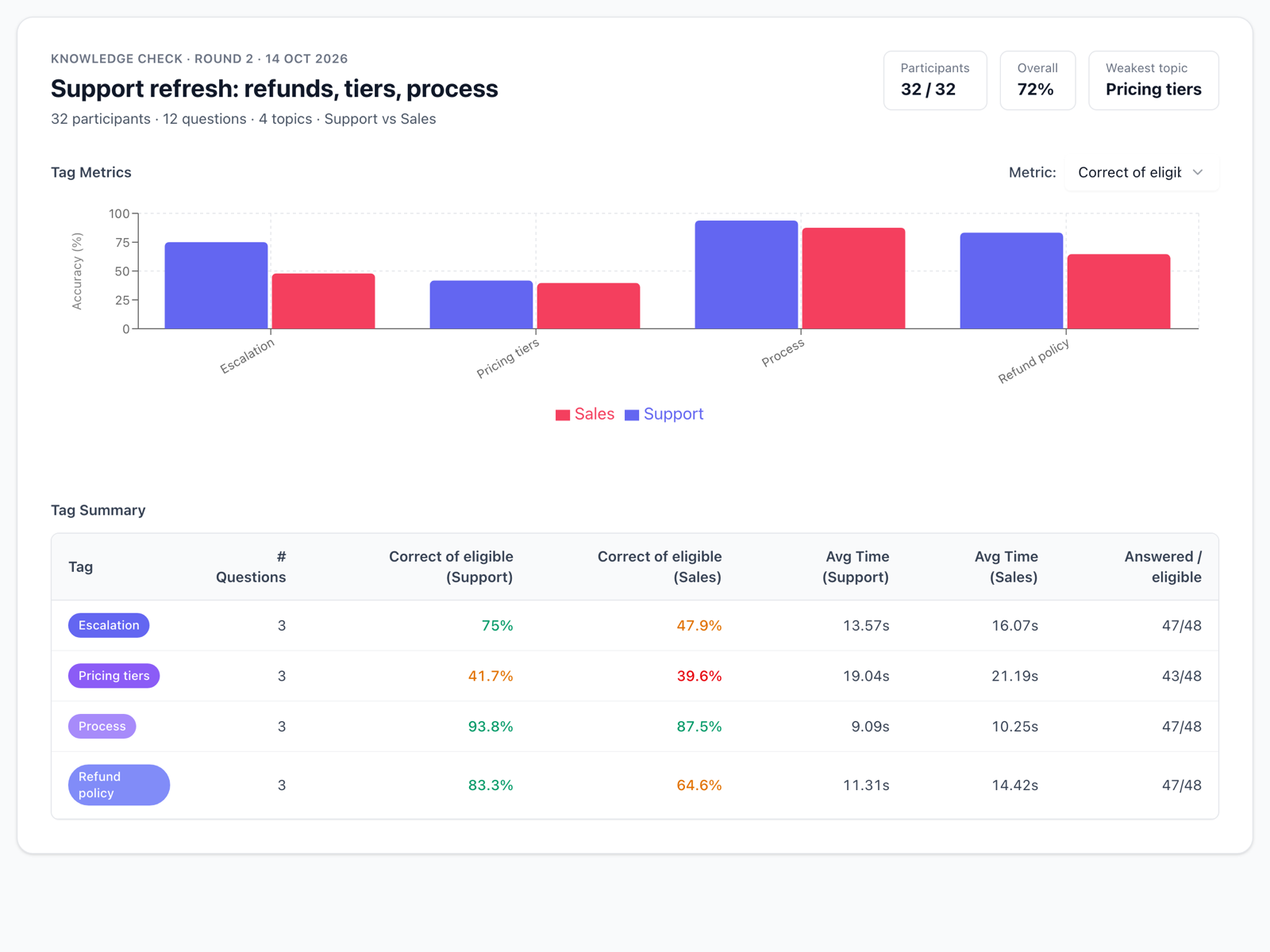
Segment Analytics shows readiness by group without changing history
Insight Explorer compares studies and live sessions side by side
Source material
Controlled runs
Export-ready proof
The workflow

One proof loop from source to insight

Bring one deck, chapter, rollout note, or campaign brief. ForQuiz creates the quiz, runs live or controlled follow-up, matches participants to segments, compares experiences, and exports proof.

01
Create from source
02
Run live or async
03
Match segments
04
Compare proof
One connected operating loop from source material to segment-aware proof
End-to-end path
One source moves through every operating step.
No handoff gaps
01
Source

Upload or paste source material

02
Draft

Create a tagged quiz fast and review the draft

03
Launch

Use a Reference Quiz when the follow-up should avoid repeated learning points

04
Access

Run it live or launch a controlled follow-up

05
Match

Control access with email, domain, phone, or custom ID

06
Compare

Match participants to cohorts, roles, batches, regions, or respondent segments

07
Export

Compare live sessions, follow-ups, and campaigns in Insight Explorer

08
Source

Export results into the workflow your team already uses

Primary use cases

Use it where understanding has to be measured, not assumed

The homepage stays broad on purpose. These are the three operating patterns where the workflow matters most.

Path 01

Training and enablement

Turn rollout docs, onboarding material, and SOP updates into live training plus adapted follow-up with manager-ready proof.

Live
Async
Proof
Path 02

Coaching and cohort learning

Turn chapters into class participation, fresh homework checks, and weak-topic reporting across batches.

Live
Async
Proof
Path 03

Frontline and partner readiness

Run short mobile checks for distributed teams, branches, franchises, and partners with identity-fit access controls.

Live
Async
Proof
Source to session
Follow-up checks
Manager proof
Outcome proof

The value is not the quiz. The value is the proof loop after it.

ForQuiz is useful when your team needs to know who understood what, which segments struggled, and whether follow-up improved the result.

What managers get back
01

Identify weak topics before they become manager escalations.

02

Compare cohorts, teams, regions, or batches in Insight Explorer.

03

Verify completion and understanding in the same workflow.

Reporting loop
91%
Completion rate
XLSX ready
Tagged accuracy
78%
84 participantsRollout pilot
Topic performance
Core messaging82%
Objection handling61%
Pricing fit74%
Create fresh follow-up checks with Reference Quiz context.
Filter reports with stored Segment Snapshots, not fragile spreadsheet labels.
Export reports that are usable downstream.
Feature proof by job

Current proof-loop depth by job

These are current capabilities, grouped by the jobs a training or readiness team needs to prove change after a session.

Create from source

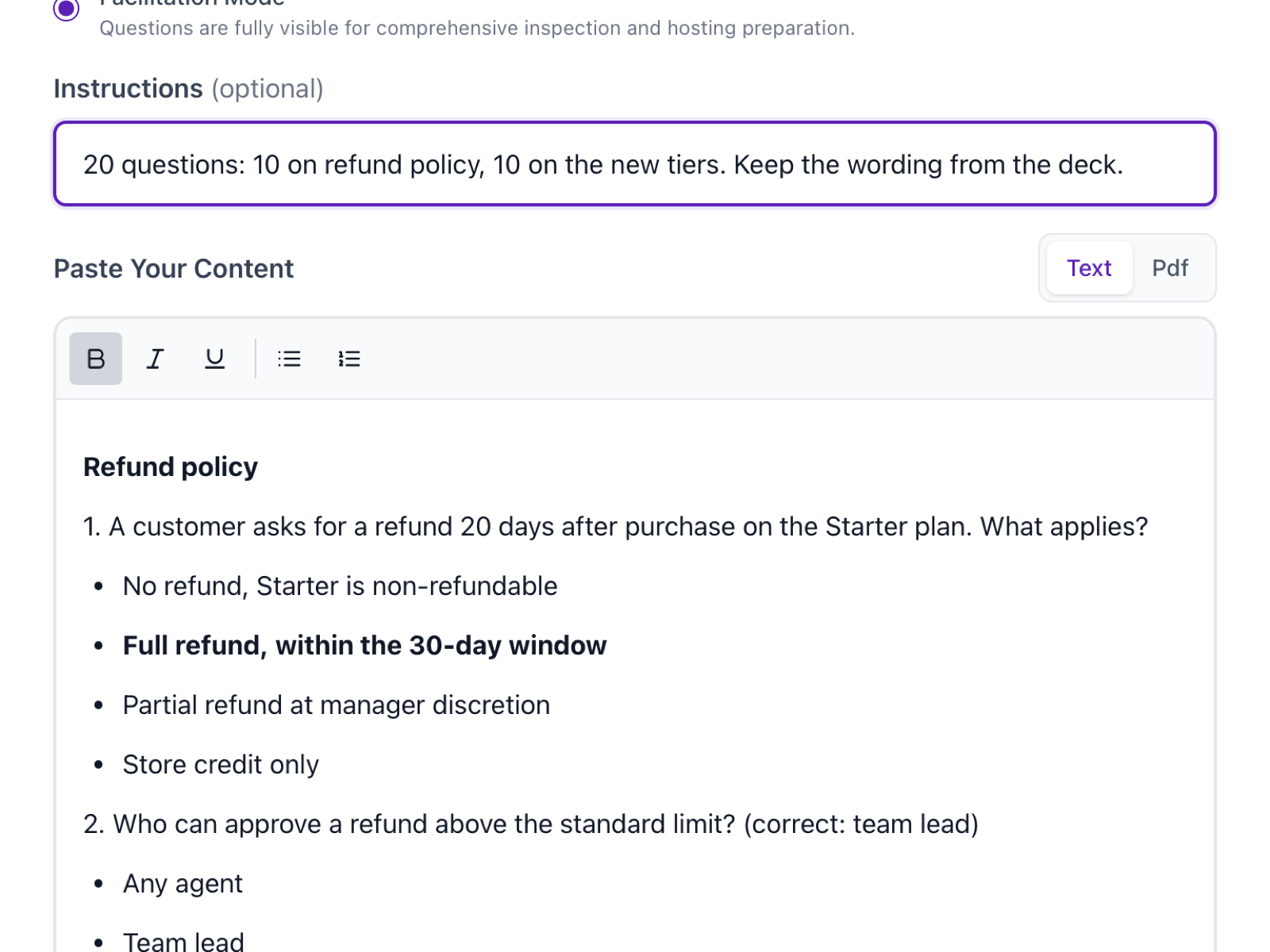
Generate editable quizzes from real source material, then create fresher follow-ups from the same context.

AI draft from docs, notes, decks, and source material

Editable questions, answers, and tags

Reference Quiz context for follow-up generation

Run live or controlled async

Run the shared moment live, then send a controlled check when retention or proof matters.

Live rooms with game codes

Controlled follow-up campaigns with schedule and resume support

Timed or timeless play

Match participants and segments

Connect attempts to the people and groups your managers already use for decisions.

Participant Directory with email, phone, custom ID, and UID identifiers

Segment Targeting for controlled participant lists

Segment Snapshots for stable historical reporting

Compare and export proof

Review who understood what, which groups need help, and how results changed across experiences.

Insight Explorer across studies and live sessions

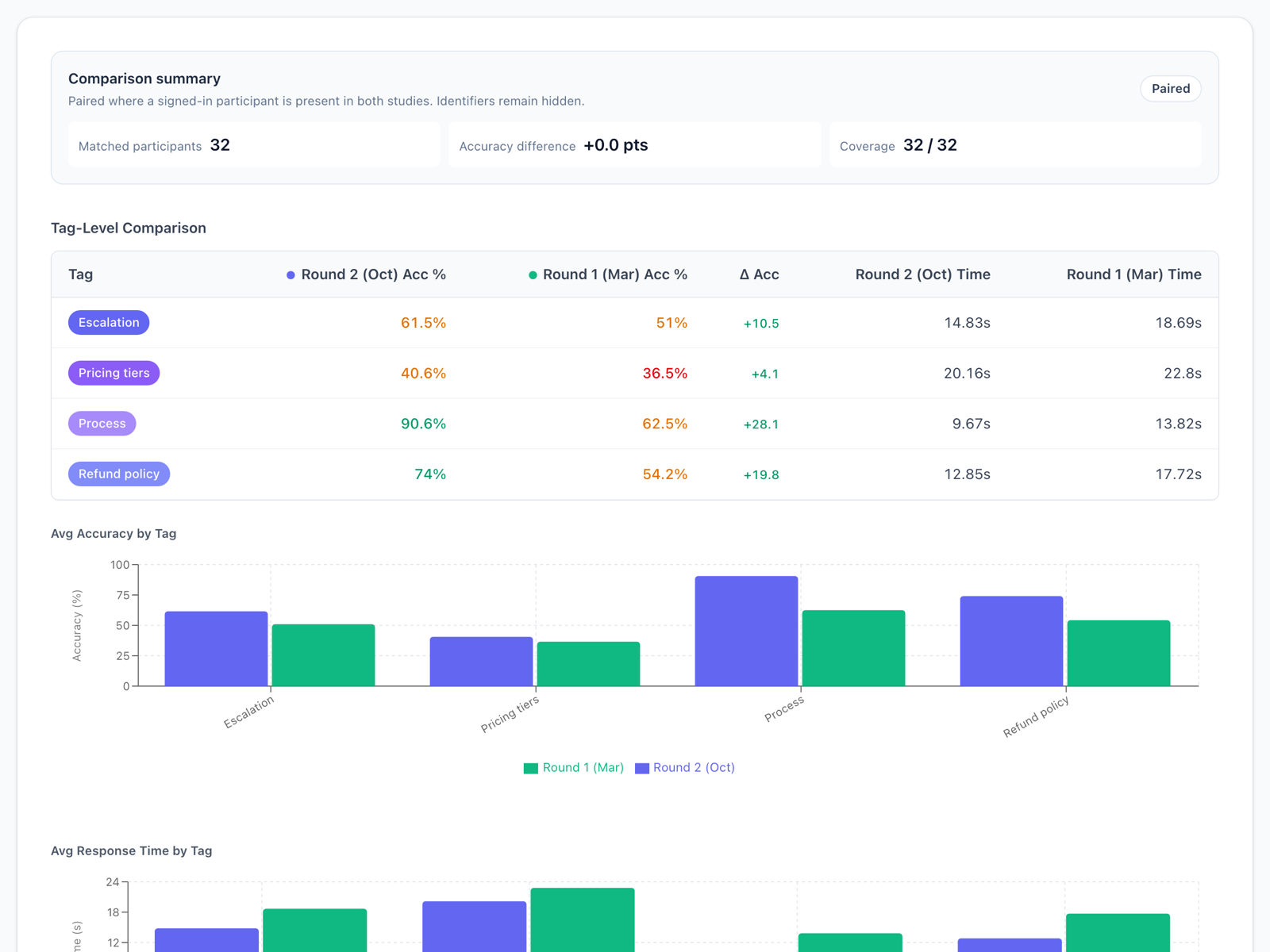
Segment Analytics and Experience Comparison

XLSX export and result files

Analytics and exports

Insight by participant, segment, and experience

Use Insight Explorer, Segment Analytics, and Experience Comparison to review completion, accuracy, timing, topic performance, and group differences before exporting.

Example reporting view
84 participantsRollout pilotXLSX ready
Completion rate
91%
Tagged accuracy
78%
Topic performance
Core messaging82%
Objection handling61%
Pricing fit74%

Insight Explorer

Review studies and live sessions in one organizer analytics workspace.

Participant Directory

Match attempts to durable people, cohorts, roles, regions, or segments.

Segment filters

Compare stored Segment Snapshots without rewriting historical results.

Live-session Segment Analytics

See live-room results by matched participants and segment groups.

Experience Comparison

Compare before and after experiences using shared tags and common participants.

XLSX export

Download participant, score, segment, and result data for follow-up.

Segmentation

Choose the path that matches your workflow

Start with the category story here, then go deeper on the page that fits your operating model.

Best fit

Training teams

Who it is for

Learning, onboarding, and enablement leaders

Main job

Prove what landed after a live session, rollout, or SOP update.

Best-fit use case

Onboarding checks, product launches, policy refreshers

Explore Team Readiness
Pilot plan

Bring one source and one reporting question. See the full proof loop.

We will use one real source to show quiz creation, live proof, follow-up proof, participant matching, Segment Analytics, Insight Explorer comparison, and export. For selected teams, the first pilot can run at no software cost.

Book a workflow demoSee analytics
Workflow plan
One real source. One live or follow-up run. One segment-aware result.
Proof loop
1

Bring one deck, chapter, SOP, or campaign brief.

2

Generate and review one quiz with topic tags.

3

Run one live quiz or controlled follow-up workflow.

4

Apply the access rules your audience actually needs.

5

Review analytics by participant, segment, question, and topic.

6

Export the report your team will use next.

Source material
Controlled access
Export-ready proof
Workflow Demo

Bring one source. We will map the proof loop.

Tell us which deck, chapter, rollout, readiness check, or campaign you need to prove. We will map it to live play, controlled follow-up, Segment Analytics, Insight Explorer comparison, and export-ready reporting.

TRY IT NOW

Experience a live quiz yourself

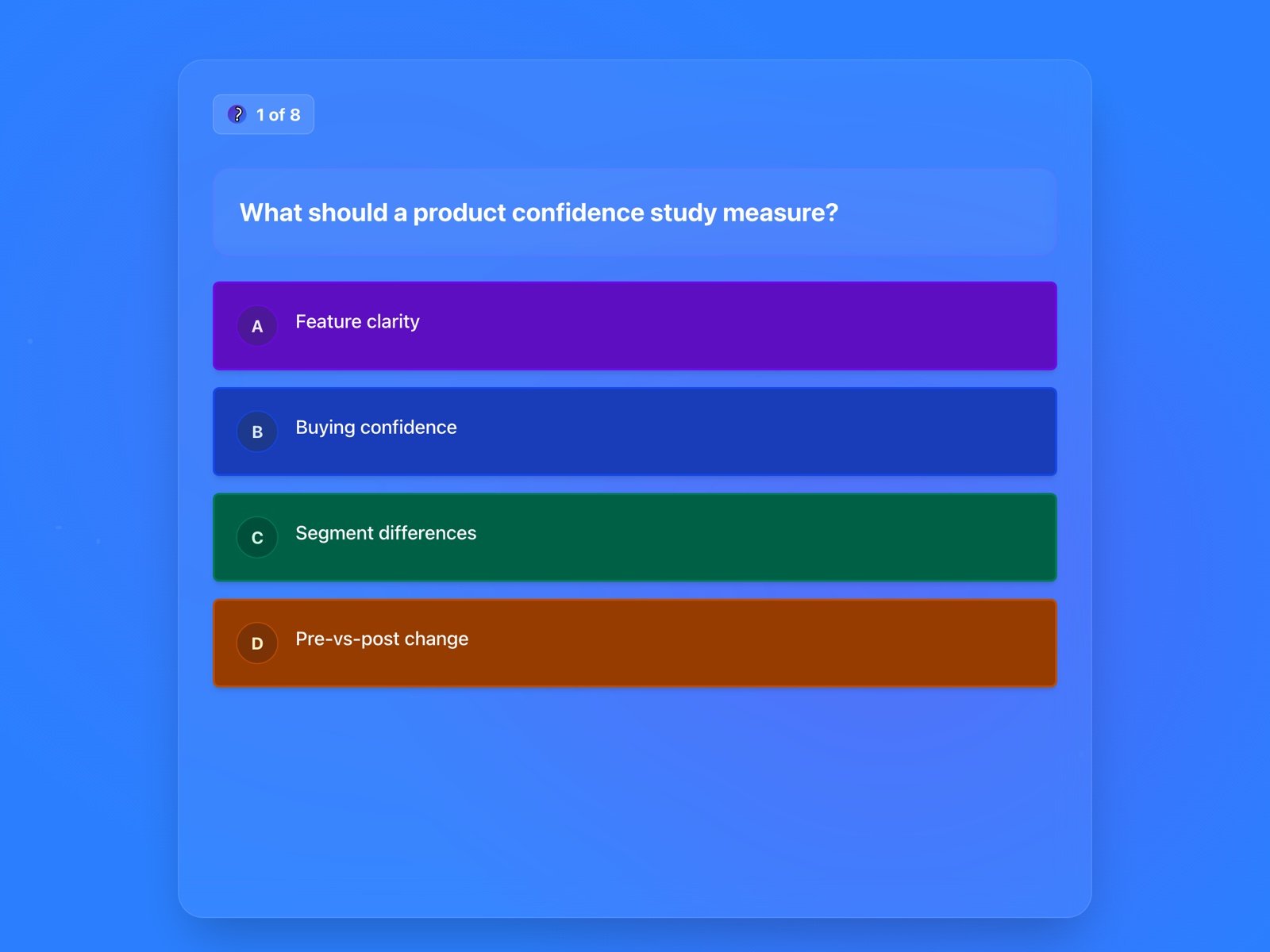
This is the participant interface. A game code, a countdown, a score. No account needed. Pick a topic and play.

Questions randomised every session - no two plays are identical
Puzzles & Logic
3 quizzes
151 questions
Science
3 quizzes
150 questions
JavaScript
3 quizzes
149 questions
Kafka/Flink/Iceberg/Pinot
3 quizzes
152 questions
Mathematics
3 quizzes
150 questions
Data Science
3 quizzes
150 questions

Want to use your own content?

Create a quiz from your own material

Upload a deck, paste notes, or type questions. Run it live or send it as a knowledge check.

Start with your contentSee how it works
ForQuiz

Quiz-led learning and readiness, with measurable outcomes.

Links

  • Team Readiness
  • Academy Growth
  • Frontline Readiness
  • Quiz Campaign Studio
  • Pricing
  • SQL Basics Quiz
  • Python Basics Quiz
  • Privacy Policy

Sound Effects Attribution

This application uses sound effects from Freesound.org

Player Join
Hi Tun Tabla.wav
by TrebuchetEffects
Attribution 4.0
Time Up
harp glissando
by PhonosUPF
Creative Commons 0
Answer & Timer Tick
Mridangam-Ghatam.wav
by xserra
Attribution 4.0
Interval Tick
FX Indian Ghungroo Anklet .aif
by bashrambali
Creative Commons 0
Winner
Bhangra rhythm 3
by sankalp
Attribution 4.0
Timer Warning
bansuri grave
by PhonosUPF
Creative Commons 0

ForQuiz - proudly made in India for the World 🇮🇳

Developed by susmitpy

© 2026 ForQuiz. All rights reserved.